
Work with map background layers
ORBAT Mapper has two types of background layers:
- Base layers: the basemap below all other layers. Only one base layer is active at a time. Your device keeps the base layer settings. The scenario does not keep them.
- Map layers: images and tile layers on top of the basemap. The scenario keeps them.
Base layers
To select the base layer, open the Settings menu (hamburger menu) in the navigation bar. Then go to the Map layers tab. As an alternative, right-click the map and select Map base layer.
The Base layers section shows the available basemaps. There you can also:
- Change the opacity of the base layer.
- Open a basemap archive from your disk with Open PMTiles archive….
- Add a basemap from a server with Add map server….
- Select the flavour (colours) of a vector basemap archive.
For more data about basemap archives and map servers, refer to Offline use.
Map layers
ORBAT Mapper supports these map layer sources:
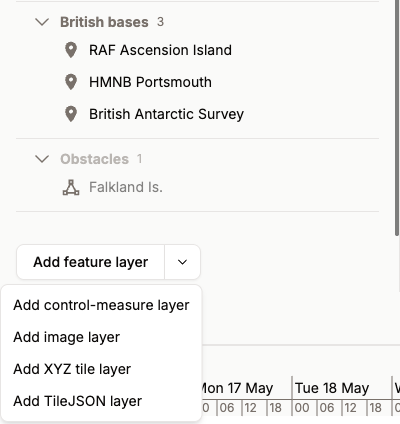
To add a map layer, open the Layers tab in the sidebar. Then use the button at the bottom of the tab and select Add image layer, Add XYZ tile layer or Add TileJSON layer. The new layer shows in the Layers tab with the feature layers and the control-measure layers. Drag it to change its position in the sequence.
XYZ tiles
XYZ map tiles divide a map into small square tiles in a grid. A web browser can load these tiles quickly. Each tile is a small image of a small area of the map. The XYZ system makes the index and the retrieval of the tiles easy.
TileJSON
TileJSON is a format that uses JSON. It gives a simple description of a set of XYZ map tiles. TileJSON is better than XYZ tiles, because it usually also gives the attribution, the available zoom levels and the extent.
Images
An image layer is one image on top of the map at a specified location. You can turn it and change its size to make it agree with the map.
KML/KMZ
To add a KML or KMZ file as a temporary map layer, use the import data dialog. To open the dialog, drag the file and drop it on the map, or select File > Import data... in the main menu. If you select the "Extract KML styles" option, ORBAT Mapper tries to use the images and the styles in the file.
The application keeps KML/KMZ layers in memory. Thus, do not add too many of them. Use them only as temporary reference layers. You cannot save them as part of the scenario. In the Layers tab, a Temp badge shows these layers.